LinkedIn™ newsletter , you’ve read some, but you don’t know how to create your own? What are the benefits of writing an effective LinkedIn™ newsletter? Do all LinkedIn™ users have access to this service? Proinfluent reveals tips and best practices for the LinkedIn™ newsletter !
Why create a LinkedIn™ newsletter?
Writing a LinkedIn™ newsletter means making an appointment with your customers or contacts and being part of their daily lives. Generally, newsletters are sent once or twice a week or a month and they are written in the form of articles. Publishing a newsletter that makes sense and contains relevant information is a real marketing tool that brings many benefits.
Personally reach your audience
A newsletter allows you to personally reach your audience. Indeed, when you publish a newsletter, your network of subscribers is notified by email as well as via a notification. Emails are more personal than a LinkedIn™ feed post.
For this, your prospects feel more involved in your company, your activity. You address them directly, thanks to a personalized email, specially written to meet their needs!
Increase your visibility on LinkedIn™
The newsletter is public content that is distributed on the LinkedIn™ feed. It can therefore be liked, shared and commented on, and this is precisely what makes it possible to boost the publication by the LinkedIn™ algorithm . Thus, the LinkedIn™ newsletter helps to increase your visibility on the network!
Demonstrate your expertise
The newsletter is a long format allowing to deepen a theme in relation to a post. This brings more value, more credibility:
The advantages are therefore:
- show your expertise and reveal your know-how and your point of view on certain subjects, which makes it possible to obtain qualified prospects;
- offer your contact list free content with high added value;
- forge an image of a leader to follow in your sector of activity.
The leads who read your newsletters certainly visit your website and your blog. When they contact you, they know part of your services and your way of doing things. They are therefore already interested in what your brand offers.
Place calls to action (CTA)
A newsletter offers the possibility of adding CTAs (Call To Actions) to send your audience back to your website or to make an appointment, for example. So it’s easier to engage people.
Regularly publishing newsletters on LinkedIn™ therefore allows you to obtain more qualified traffic on your website and your LinkedIn™ account, but also to attract hot prospects and increase your notoriety in your field of expertise.
Discover our tutorial now to create a newsletter on LinkedIn™ in just a few clicks!
How do I create a LinkedIn™ newsletter?
LinkedIn™ Newsletter and Creator Mode
The first thing to know is that writing a newsletter on LinkedIn™ requires activating creator mode . Concretely, this allows users to follow you and no longer to connect to your LinkedIn™ profile. Everyone (except business pages) can choose to adopt it!

Warning ! Because if the creator mode allows you to become an influential person and increase your audience on the social network, the subscribers you gain are not connections! This means that they can see your profile and your content, but it is not necessarily reciprocal! It also means that you receive fewer invitation requests since members follow your profile directly!
To learn more about creator mode, discover our tutorial article here !
Create a LinkedIn™ Newsletter
Here’s how to create a LinkedIn™ newsletter when creator mode is enabled:
- Log in to your LinkedIn™ profile and go to your homepage;
- Click on “Write an article”, then on “Create a newsletter”. And There you go ! You are already in the LinkedIn™ newsletter creation tool!
- Now all you have to do is add the title, description, publication frequency, as well as the logo (300 x 300 pixels) and the cover photo (744 x 400 pixels).
- When it’s done, start writing the content of your newsletter!
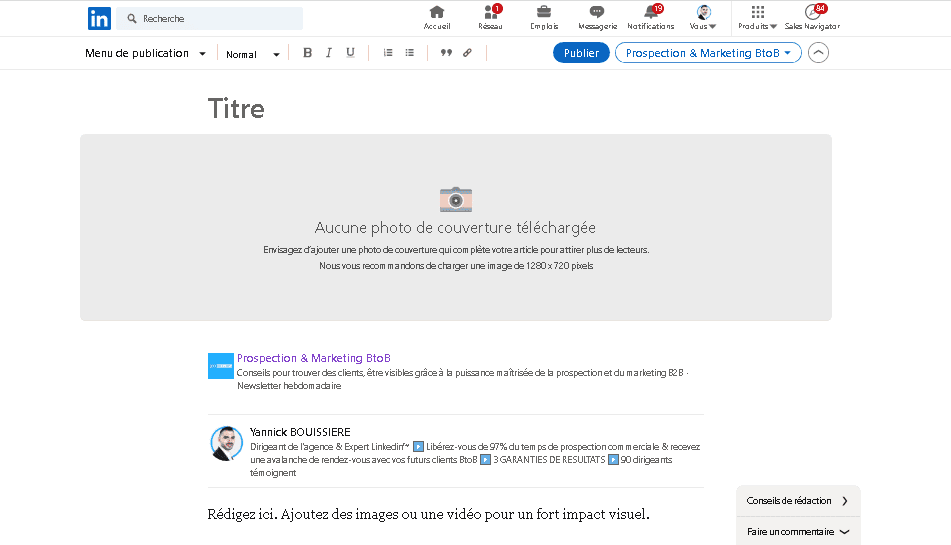
For your newsletters to benefit from greater visibility, don’t forget to tick the box “Invite my contacts and people who follow me to subscribe”. It is also advisable to select “Subscribe to my newsletter”, in order to obtain an overview of the content sent to your contacts.
Learn how to use LinkedIn™ and optimize your profile with our free online conference !
How to properly optimize a LinkedIn™ newsletter?
A well-optimized LinkedIn™ newsletter becomes a real marketing tool. It brings together many members and allows you to gain notoriety and visibility. Discover now the 6 essential criteria to take into account for a successful newsletter with LinkedIn™.
1/ Determine a regular publication frequency
You have to determine how often you want to publish your content. LinkedIn™ allows the distribution of a LinkedIn™ newsletter every 24 hours, however publishing 1 or 2 articles per week is more than enough.
The important thing is regularity! When you regularly distribute your content, you give users an appointment and you show them your expertise in your field of activity.
You put in place a real content strategy respecting the codes of inbound marketing . By posting on a regular basis, you build reader loyalty, create engagement and brand attachment.
2/ Choose relevant and concrete information
Indeed, be clear from the title of your newsletter! Your subscribers and members of your network should immediately understand what topic your article is about and whether it concerns them or not. In addition, it must arouse the curiosity of readers to make them want to read your message and generate a high rate of engagement .
The description and content of the newsletter follow the same line of conduct. This is concrete information such as:
- The novelties of a brand;
- The most powerful marketing automation software;
- The most powerful feature of LinkedIn™;
- The list of new SEO criteria for a browser;
- Using this software will increase your number of subscribers.
Do not fall into self-promotion by praising the services of your company! The people who read your newsletters are waiting to find a solution to their need or an answer to their question! To create effective posts and gain subscribers, your LinkedIn™ newsletter must bring real added value to your profile.
3/ Add relevant and professional visuals
At the same level as an article, a newsletter on LinkedIn™ must contain attractive and relevant visuals with your content.
The LinkedIn™ newsletter accepts several types of visuals:
- A logo whose dimensions to respect are 300 x 300 pixels;
- An article top cover (744 x 400 pixels);
- Images, visuals, diagrams that you insert into the content to enhance and illustrate your remarks.
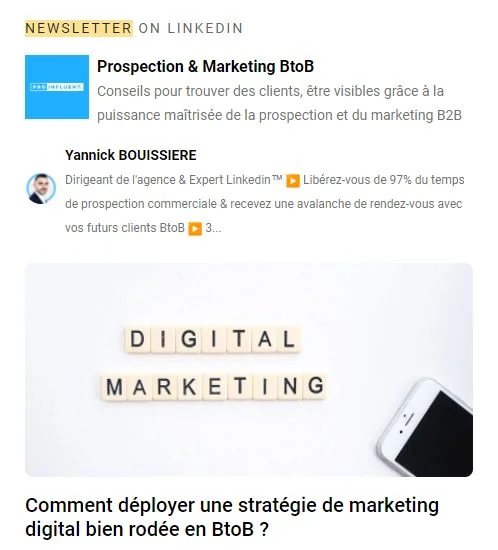
Don’t forget that an article with images is much easier and more pleasant to read. So, put the odds on your side and encourage readers to read you with attractive images!
4/ Write a structured message
Visuals are not the only elements that make your article easier to read. To encourage the person to read your Newsletter to the end, consider structuring and purifying it when creating it. Indeed, there is nothing more discouraging than a block, without line break or paragraph.
It’s a simple, yet effective tip that will get your contacts enjoying your LinkedIn™ newsletter and looking forward to the next one. So, structure your article with titles, bold words, images and paragraphs!
5/ Place a call to action
Indispensable in email marketing , the call to action allows readers who wish to go further. These are clickable links or buttons or simply a sentence encouraging people to comment on your post.
The LinkedIn™ newsletter is no exception to the rule, it is a good idea to add a call to action that encourages your network to react: see an article on your site, make an appointment, comment on the publication on LinkedIn™. .
6/ Take care of your first LinkedIn™ newsletter!
The LinkedIn™ newsletter is a powerful multi- channel tool that helps boost author awareness. Indeed, in addition to being notified through LinkedIn™ notifications, subscribers also receive emails to inform them of the publication of your newsletter. When you publish your first newsletter, your entire network is informed, on LinkedIn™ and by email!

It is therefore a question of optimizing and caring for it as much as possible, to show the skills of your company!
To receive Proinfluent’s LinkedIn™ newsletter every week, click here to subscribe.
LinkedIn™ newsletter to conclude
- The creator mode must be activated to publish a newsletter on the social network.
- To write it, just go to the home page of your profile, then click on “Write an article” and “Create a newsletter”.
- It is important to give a title and a description that clearly define the subject matter.
- Adding a 300 x 300 pixel logo and a 744 x 400 pixel cover photo is recommended to catch the eye and make the content more attractive.
- Structuring your content using titles, images, paragraphs and line breaks is essential to make reading more fluid and enjoyable.
- Adding a call to action is strongly recommended so that the prospect can act if he is interested (share, comment, contact you…)
LinkedIn™ newsletter to summarize in 4 questions
How do you make a newsletter on LinkedIn™?
To get started, make sure you’ve enabled creator mode on your LinkedIn™ account, then:
- From your dashboard, go to your home page;
- In the post writing tool, click on “Write an article”, then on “Create a newsletter”;
- Add the title, description, publication frequency, logo of your newsletter then write your content!
- Don’t forget to check the “Invite my connections and people who follow me to subscribe” box to notify your network of your new content!
Why write a LinkedIn™ newsletter?
The newsletter on LinkedIn™ allows you to:
- Disseminate your expertise and know-how. You gain subscribers and expand your notoriety.
- Reach your audience more personally, by sending them high value-added content by email.
- Place call to action to send users to the destination of your choice (website, email, agenda for making appointments, etc.).
How do I delete a LinkedIn™ newsletter?
It is possible to delete your LinkedIn™ newsletters at any time, for this:
- Click on “Edit”;
- Then on “Delete” from the editor of articles that are located below your cover photo.
Be careful, deleting your LinkedIn™ newsletter is irreversible and it is difficult to be able to write it again afterwards.
How do you write an effective LinkedIn™ newsletter?
To engage your audience and create a connection through your LinkedIn™ newsletter, make sure it has:
- A short and intriguing title, which clearly defines the subject matter;
- A description that briefly describes the content of the item;
- A logo measuring 300 x 300 pixels;
- A cover photo of 744 x 400 pixels;
- Titles, images and paragraphs to structure and facilitate reading.