Pixel LinkedIn (LinkedIn insight tag): how to install it on your website?
Always more concerned with satisfying the user experience, LinkedIn had also entered the advertising market. LinkedIn Ads is the platform that allows LinkedIn members to post diverse and varied advertisements, tailored to their goals. The purpose of LinkedIn Ads? Generate traffic on the websites of its members, so that they earn new ones prospects to convert into customers! But LinkedIn didn’t stop there! The social network has set up a LinkedIn pixel to be integrated into its website in order to be able to analyze the activity generated on it through advertisements. To better understand what the LinkedIn pixel is, how to install it on your site and get the most out of it, read on!
1. Pixel LinkedIn or LinkedIn Insight Tag: what is it?
The LinkedIn Insight Tag or also called Pixel LinkedIn, is a tag to integrate into the pages of your website, in the form of a code that is easy to set up. It will analyze in real time the profiles of people who have visited your site following an advertisement. Thanks to this system, you will have access to many statistics that will inform you about the commitment of your LinkedIn Ads ads . In addition, the LinkedIn pixel will bring you information on the people who visited your website.
To read also: the tutorial to create your first LinkedIn Ads advertising campaign.
Working directly with the platform LinkedIn Ads of the social network, the LinkedIn pixel installed on your website is syncs with the activity generated by your ads. You can therefore the LinkedIn Ads platform to visualize everything that is happening on your website, thanks to an interface specially dedicated to the LinkedIn pixel installed on your site. Studying the behavior of your visitors is possible thanks to the pixel LinkedIn, so why deny it?
2. How do I install the LinkedIn pixel or LinkedIn Insight Tag on my site?
Wondering how to install the LinkedIn pixel? Nothing’s easier ! You will have to install the JavaScript code corresponding to the LinkedIn Insight Tag (unique for each advertising campaign) to the pages of your website. Rest assured, behind these technical terms, it is rather simple. Follow these few steps:
- Go to the platform Campaign Manager , from where you manage all your LinkedIn Ads
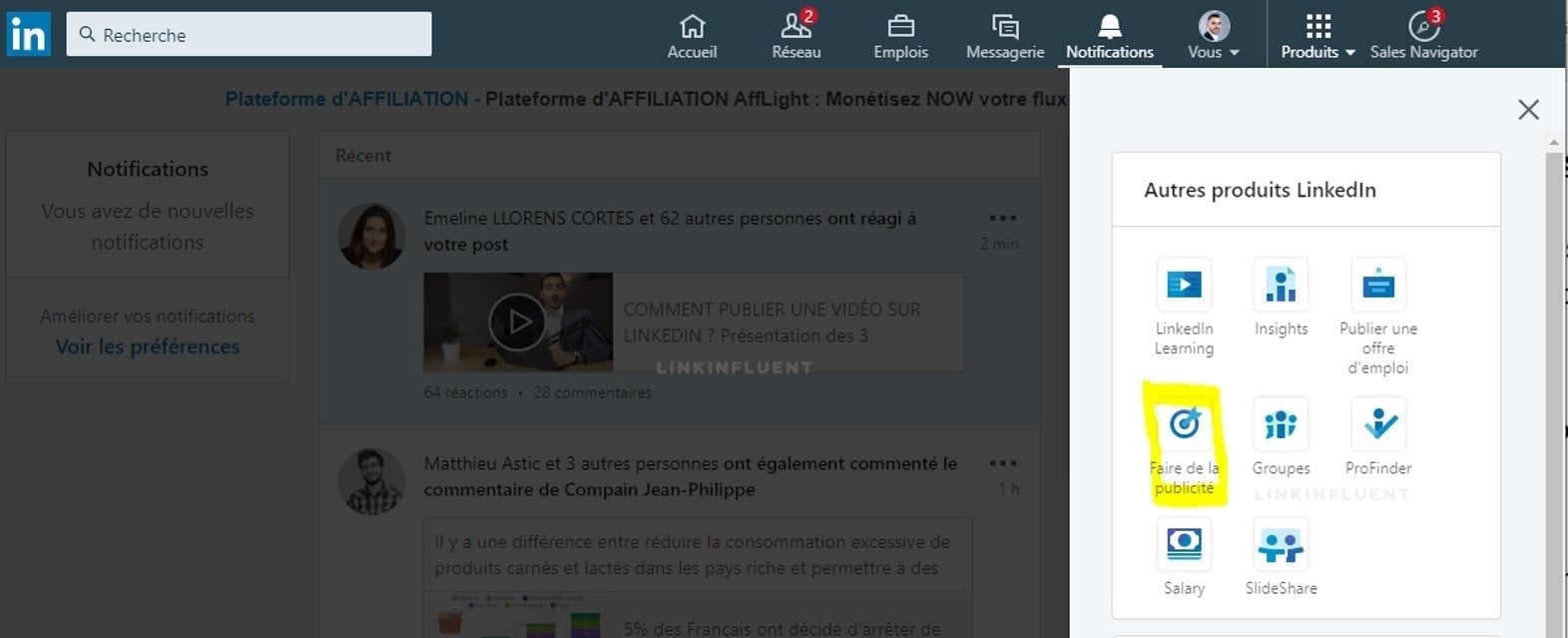
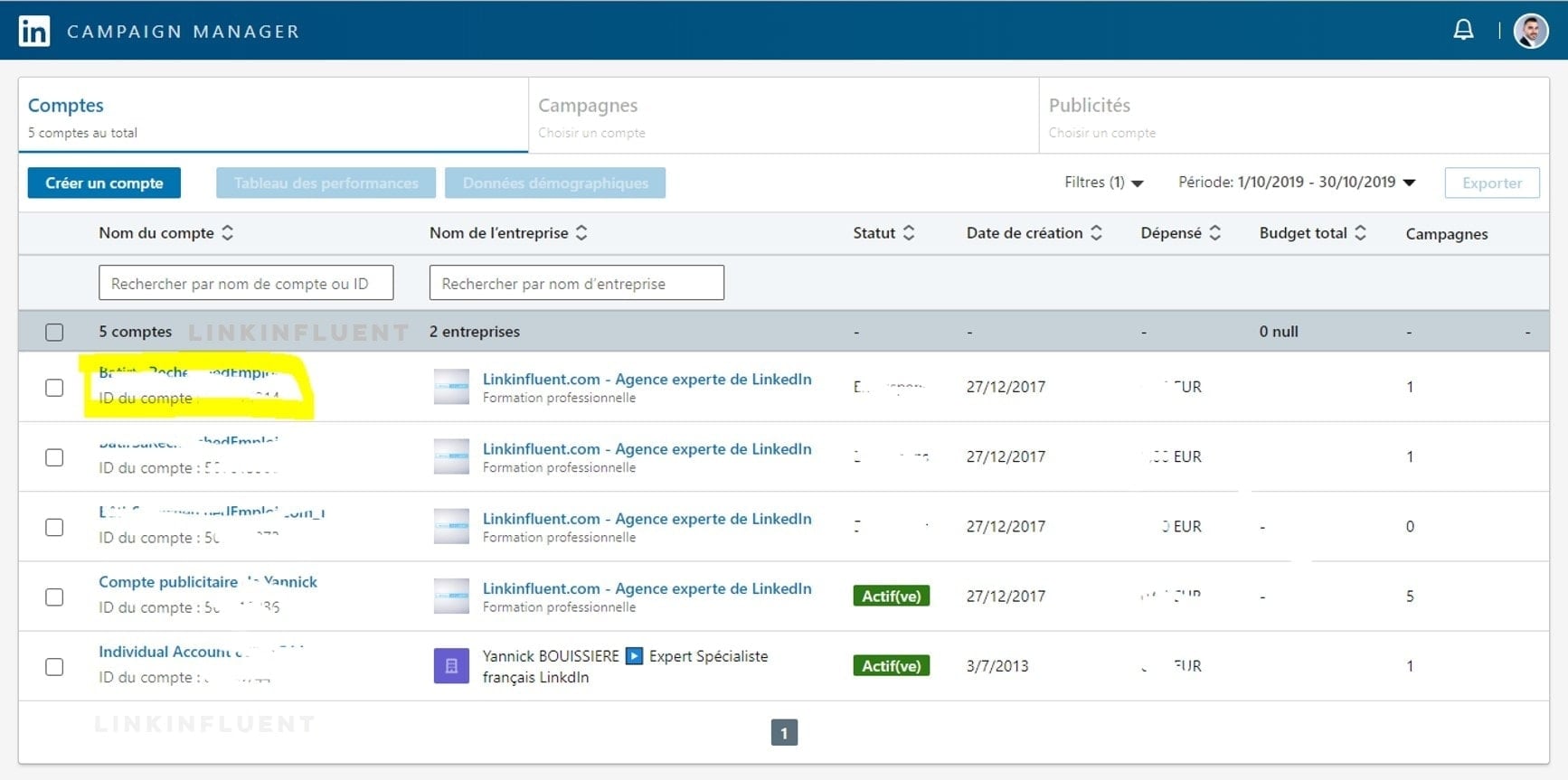
- Click on the name of the account you want to track:
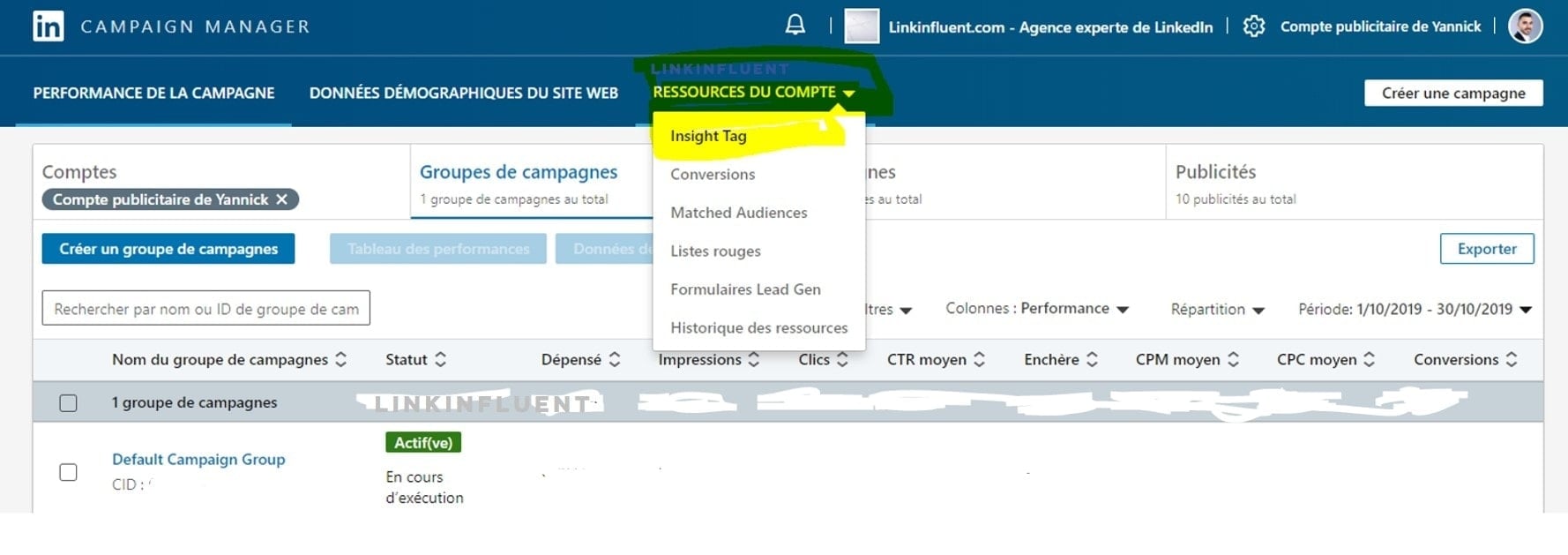
- In the tab Account Resources , click on Insight Tag :
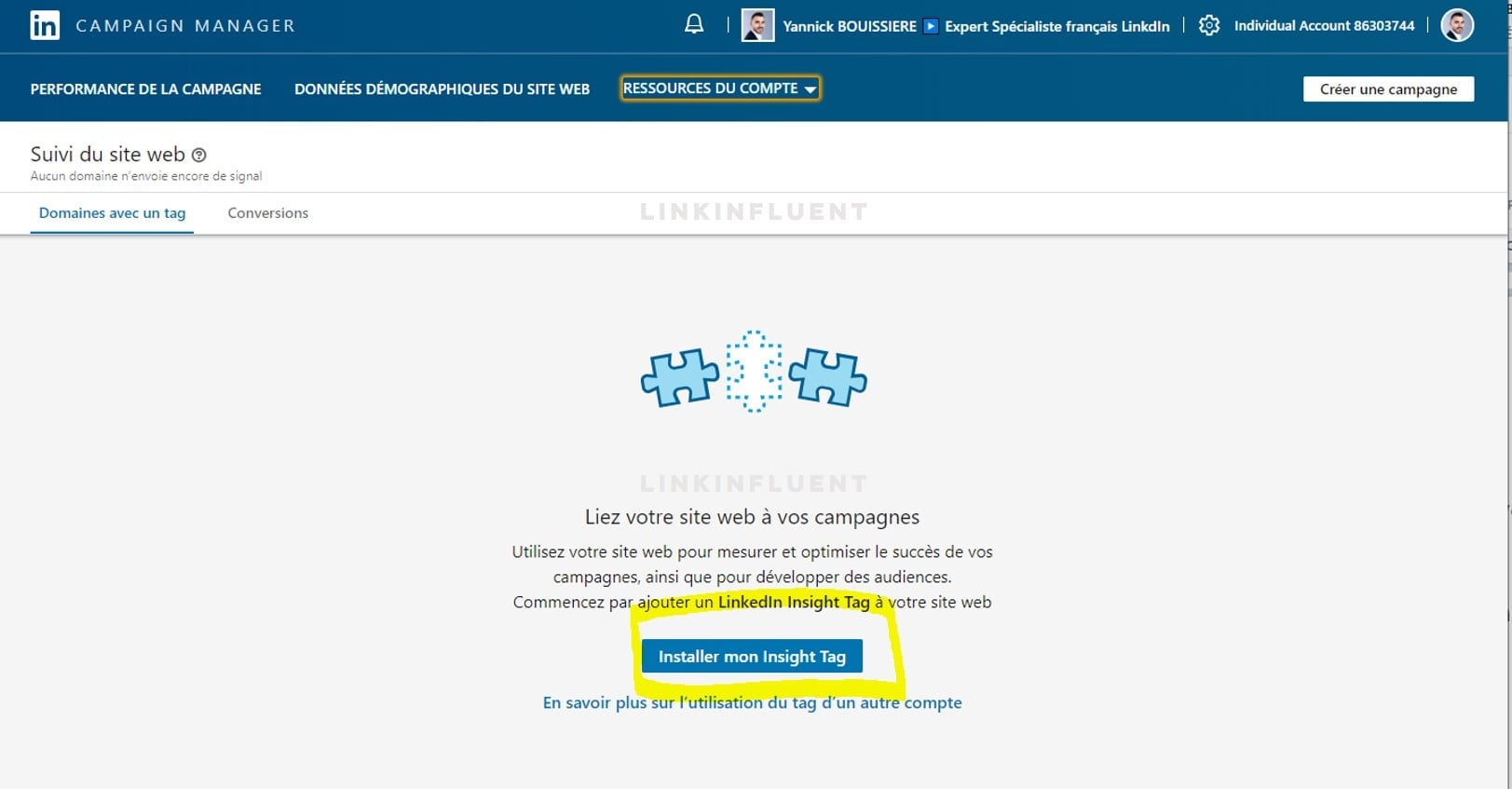
- Then on Install my Insight Tag :
- Select the method that suits you:
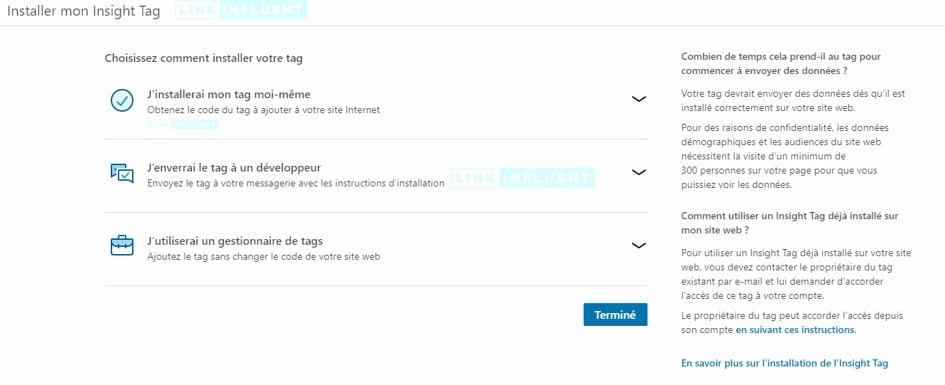
- A code will appear, which you will need to copy:

- Go to the administration interface of your website to install the LinkedIn Insight Tag code and paste the code in the header and footer of your website (or, if your web interface management does not allow it, on every page of your website).
After a validation period ranging from a few minutes to 24 hours, your LinkedIn Insight Tag will appear in the Campaign Manager interface as being Active .
3. Measure the effects of the LinkedIn pixel or LinkedIn Insight Tag on your site
As you can see, the great advantage of the LinkedIn pixel on your site is to be able to collect, analyze and take into account all the information necessary for the smooth running of your advertising campaign on LinkedIn. Using LinkedIn Insight Tag is giving yourself an additional tool to carry out a business strategy on LinkedIn .
By analyzing the flow information given by the LinkedIn pixel, you will be able to respond to very many questions:
- What is the typical profile that emerges from visits to the website?
- What are the times when the traffic is most intense / least intense?
- Are Internet users going to visit other website pages?
- Which pages of the website are most catch the attention of Internet users?
- How do the prospects who visit the website converted to customers?
Depending on the goals you set during the creation of your advertising campaign with LinkedIn Ads, LinkedIn Insight Tag can allow you to develop a “real logbook advertising ”, and thus adjust according to the results obtained your current campaigns, the ones you have planned, and even your entire strategy overall! Information you collect with the LinkedIn pixel are valuable indicators.
By analyzing the results provided by the pixel LinkedIn, you will be able to perform a large number of actions aimed at improve the engagement of your advertisements, and the conversion of your prospects into clients. By having better knowledge of the characteristics of visitors to your website, you will also be able to refine your buyer personas, which will improve your entire social selling on LinkedIn .
By collecting information on visitors to your website as well as many other elements, the Linkedin Insight Tag associated with your LinkedIn Ads advertising campaigns will allow you to better understand the behavior of your prospects and thus be able to adjust your advertising and other actions. marketing. It is a tool to install urgently if you want to better perceive the ROI (Return on Investment) of your advertisements on LinkedIn and better identify your target customers. Above all, the LinkedIn pixel to install on your website is a very effective way to see the traffic generated by LinkedIn. Coupled with specific objectives, the LinkedIn Insight Tag is a formidable tool for those who want to turn their LinkedIn advertisements into a machine for converted prospects!
4. Pixel LinkedIn or LinkedIn Insight Tag: to remember
- You don’t have to be an IT professional to use the LinkedIn pixel: a simple copy and paste of the code in the administration interface of your website and you’re done
- Once the LinkedIn Insight Tag is installed on its website, it is easy to study visitor behavior: more efficient time slots, most visited pages, visitor profiles, etc.
- With precise monitoring and equally meticulous analysis, the information collected by the LinkedIn Insight Tag will become real allies in your marketing strategy. social selling on LinkedIn !